• The “Sync” Button Isn’t Lying to You — Your Branch Is

    I nearly shipped six commits straight to a shared branch a teammate was actively building on — with nothing more dramatic than one click of VS Code’s “Sync” button, on a branch I was sure was my own.

    The cause: origin/shared-branch in git checkout -b my-fix origin/shared-branch is obviously the starting point for the new branch’s history — but by default, git also treats it as the branch’s upstream, meaning my-fix becomes an alias for origin/shared-branch for push purposes, even as its own commits diverge locally. The local name is cosmetic; the tracking relationship is what actually decides where “Sync” sends your commits, and from that moment, every Sync pushed straight to the shared branch. The tell in hindsight: a brand-new branch should show “Publish Branch,” not “Sync.” Seeing Sync on something I’d just created was the red flag I missed.

    Cleaning up: resist force-push on a shared branch — someone may have already fetched it. Instead: push the commits to their own branch, git revert them on the shared branch (adds undo-commits instead of rewriting history), then cherry-pick the same commits onto a fresh branch off the now-reverted tip and open a normal PR. A few extra minutes, zero rewritten history.

    The real fix — stop relying on catching it in the moment:

    git config branch.autoSetupMerge false

    This disables git’s default auto-tracking whenever a branch is created from a remote ref — the exact mechanism behind the mistake. Every new branch now starts with no upstream at all, so “Publish Branch” always appears first, forcing a conscious choice before anything gets pushed anywhere.

    When a tool does exactly what it’s configured to do, the fix isn’t “be more careful” — it’s changing the configuration so the mistake can’t happen again.

  • Apple Music & Favorites

    Apple Music bug that’s bothering me at the moment. Favorites working unreliably! In the screenshot below of the main Apple Music user interface, you can see the star beside the song title. That means I’ve marked it as a favorite:

    But, if I right-click the Apple Music app in the Dock, the song isn’t marked as a favorite (the word Favorite should have a checkmark to the left of it):

    To make matters worse, sometimes when I right-click the Apple Music icon in the Dock, ‘Favorite’ isn’t even there:
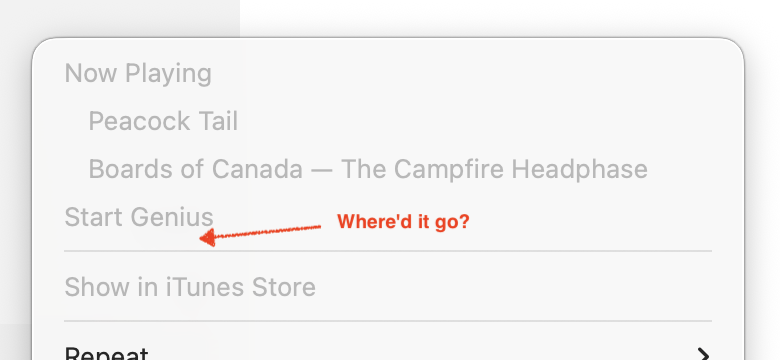
    So, when I want to favorite something, I’ve taken to opening up the main Apple Music user interface and clicking on the hollow star to the right of the track name to turn it red, like shown in the first screenshot. At least doing it this way seems reliable. This is annoying and disruptive. Apple, please fix!

    For my own notes, this is macOS Tahoe 26.3, Apple Music 1.6.3.2, and the song in question while behavior was observed was being streamed from an auto-generated Apple Music Radio Station (“Aphex Twin & Similar Artists Station”, if you must know.. so nosy. Haha).